Redaction that takes the data out of the file.
Send a PDF or a scan. Tranly finds the personal data, you check every area, and the data leaves the document — not just the screen. The rest of the page stays exactly as it was.
On the Pro plan and above. 1 credit a page to find the data; applying it after that is free.
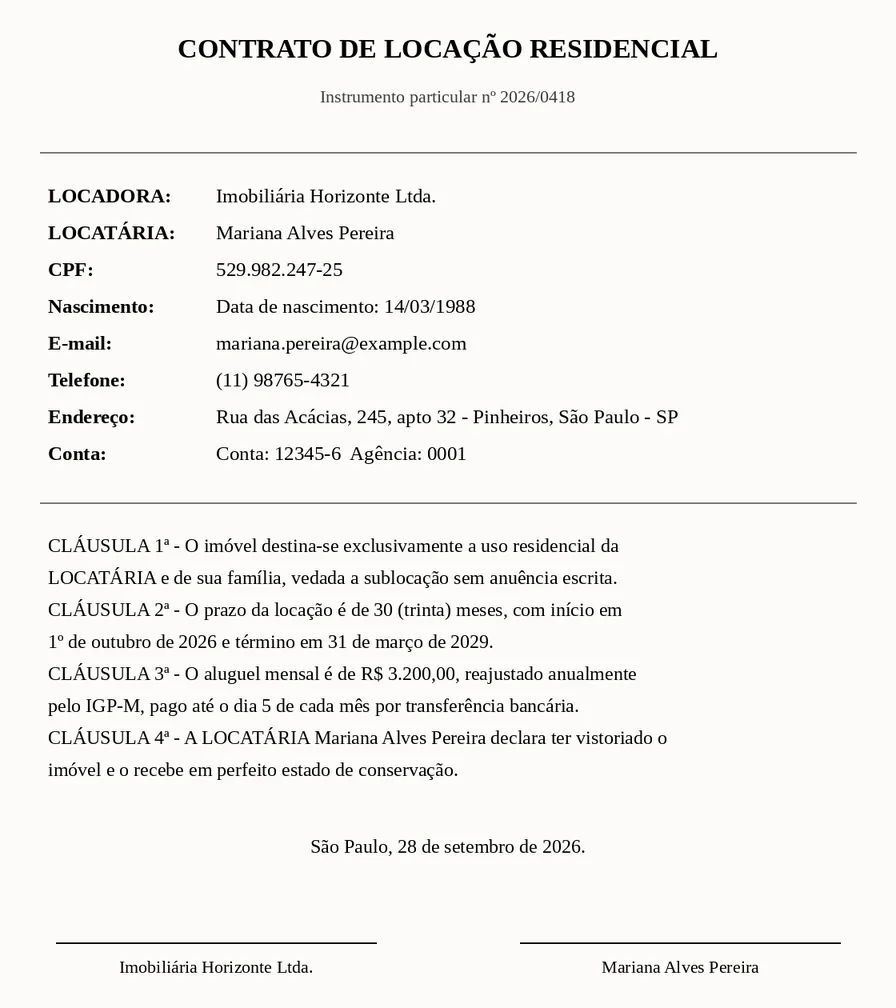
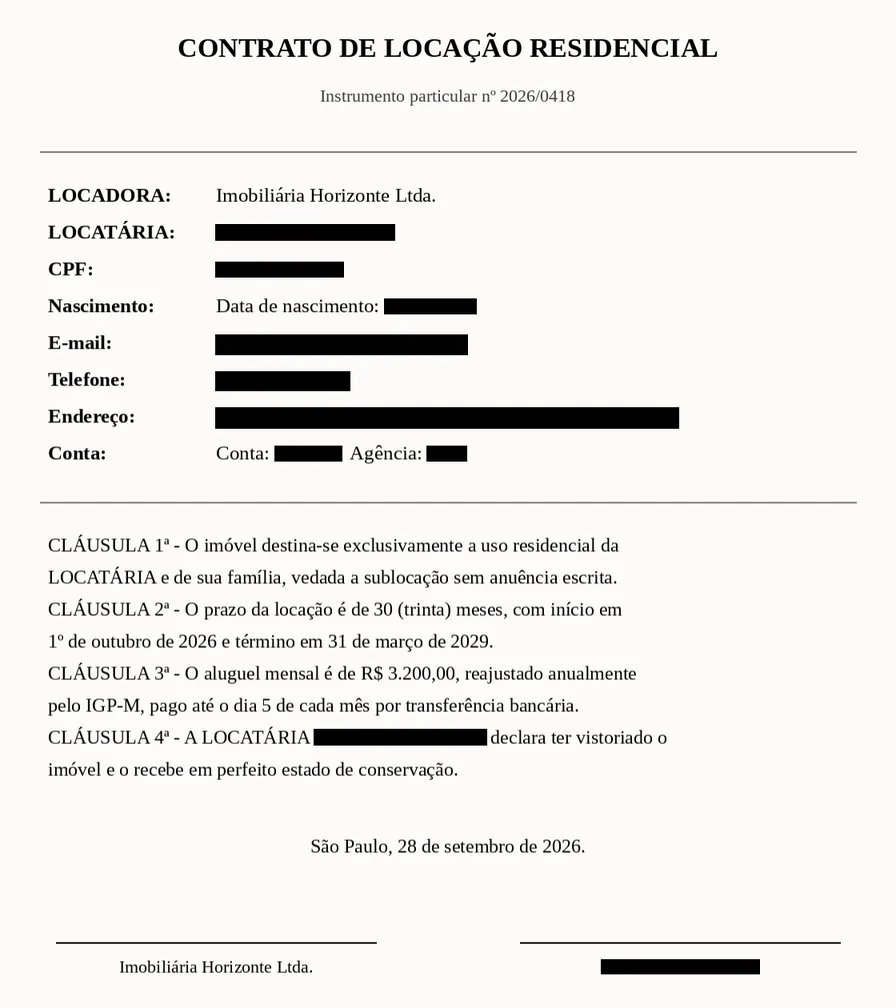
Paint over text is not redaction
Three ways a document that looks redacted still gives the data away.
The text is still under the box
A rectangle drawn over a PDF covers the letters on screen. The letters stay in the file, and anyone can select and copy them. We remove them from the file.
The name lives in more than one place
The author field, a form value, a note or a bookmark can repeat the same name. We remove a covered text from all of them.
A scan keeps its pixels
On a scanned page the data is the picture. We erase the pixels under each box, and the box marks where they were.
Three steps, and you approve each one
Nothing is removed until you say so.
Choose what to hide
Upload a PDF or an image and pick the kinds of data to find. Add your own words, such as a project name.
Check the areas
Every proposed area is drawn on the page. Click to keep or drop it, or drag to add one.
Download the verified PDF
We remove the data, read the file again to prove it is gone, and hand you the PDF.
What it finds
Pick any of these, in Portuguese, English, Spanish, French and German documents.
- Names of people
- ID numbers (CPF, RG, SSN, passport)
- E-mail addresses
- Phone numbers
- Postal addresses
- Dates of birth
- Bank accounts and cards
- My own texts
Numbers with a check digit — CPF, CNPJ, IBAN, payment cards — are checked before they are proposed. You review every area before anything is removed.
The same redaction, from your code
Detect with one call, apply with another, or do both in one call for a pipeline with no review. Synchronous answers, signed webhooks and idempotency work as they do for translation.
Read the reference# 1. Find the data. Each area is a page, a box and a category.
curl -X POST "https://api.tranly.co/v1/redact/detect" \
-H "x-api-key: $TRANLY_API_KEY" \
-H "Content-Type: application/json" \
-d '{
"source": { "kind": "pdf", "contentBase64": "JVBERi0xLjcKJ..." },
"categories": ["person_name", "id_number", "email"]
}'
# 2. Remove the areas you kept. Naming the detection makes this call free.
curl -X POST "https://api.tranly.co/v1/redact/apply" \
-H "x-api-key: $TRANLY_API_KEY" \
-H "Content-Type: application/json" \
-d '{
"source": { "kind": "pdf", "contentBase64": "JVBERi0xLjcKJ..." },
"detectionJobId": "9b1e...",
"areas": [{ "id": "p1_a0", "page": 1, "category": "person_name",
"bbox": { "x": 0.12, "y": 0.2, "width": 0.3, "height": 0.02 } }]
}'Part of the Pro plan
Redaction is included from the Pro plan up. Finding the data costs 1 credit a page, like a translated page. Applying it after a detection of the same file is free.